Mogadishu
Salaam Bank Logo

Personal Banking

Discover personal banking solutions designed to help you save, spend, and grow your money with ease.

Explore Personal Banking

Explore all banking solutions tailored for you.

Business Banking

Comprehensive banking services tailored for businesses of every size — from startups to large enterprises.

Explore Business Banking

Explore all banking solutions tailored for you.

International

Invest in Somalia's growing economy and access humanitarian banking services through our global partnerships.

Explore International

Explore all banking solutions tailored for you.

About Us

Learn about Salaam Bank's history, leadership, social impact, and our commitment to compliance and transparency.

Learn More About Us

Explore all banking solutions tailored for you.

Mobile App Support

How to Delete Your Account

We're here to guide you through the steps to permanently delete your account from our mobile app. Please note that once your account is deleted, all data will be removed, and you won't be able to recover it.

Step 1

Open the app, click the Profile tab, and go to the Settings page by tapping the gear icon at the top right corner of your screen.

Step 2

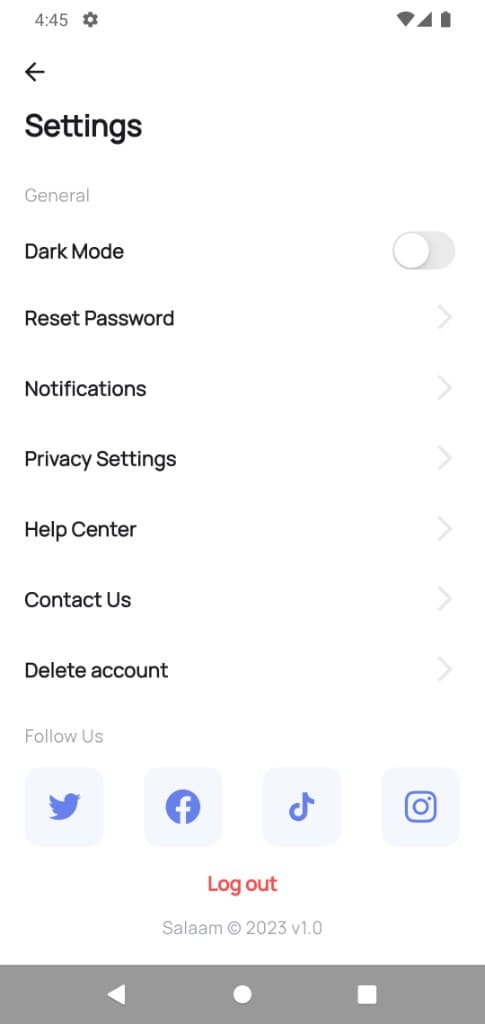
Scroll down and select the Delete account option.
Account options screen showing Delete account

Account options screen

Step 3

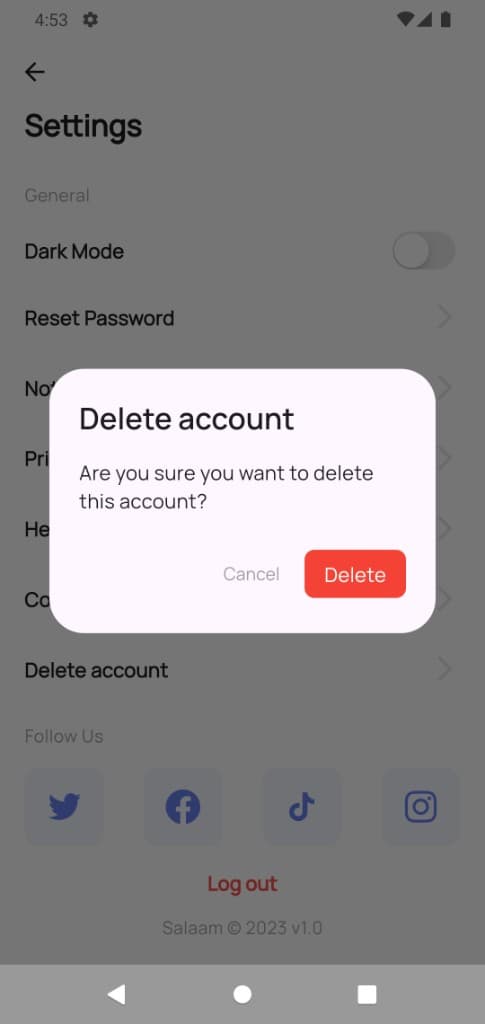
Tap on the Delete Account button. You will be prompted to confirm your choice.
Delete account confirmation screen

Delete account screen

Step 4

Confirm your choice and then press Delete to complete the process.